ReviewHub Documentation
Complete guide to commands and configuration options
/review or /vouch
UserSubmit a review or recommend another user (depending on server mode)
/rateme
StaffRequest a review from a specific user (admins or roles set in /config access)
/rateme @User
/stats
UserView server or user statistics with Global Stats option
/stats @User
/leaderboard
UserView TOP 10 most active members
/help
UserView all commands and important links
/config
AdminConfigure bot settings - use /config server, /config appearance, or /config access
/deletereview
AdminDelete a review by ID
/deletereview id:abc123
Options are grouped into three slash subcommands (Discord limits how many fit in one command).
/config server - Channels & core
reviewchannel
Where reviews are published
reportchannel
Where reports are sent
/config appearance - Buttons & Template
reviewbuttonshow
Show/hide submit button
reportbuttonshow
Show/hide report button
usefulbuttonshow
Show/hide useful button
reviewtemplate
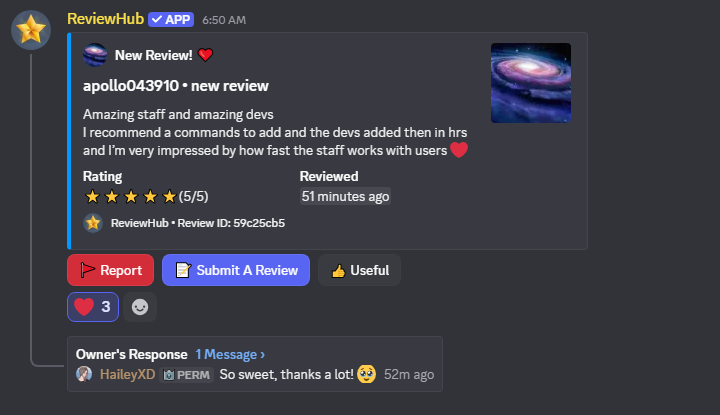
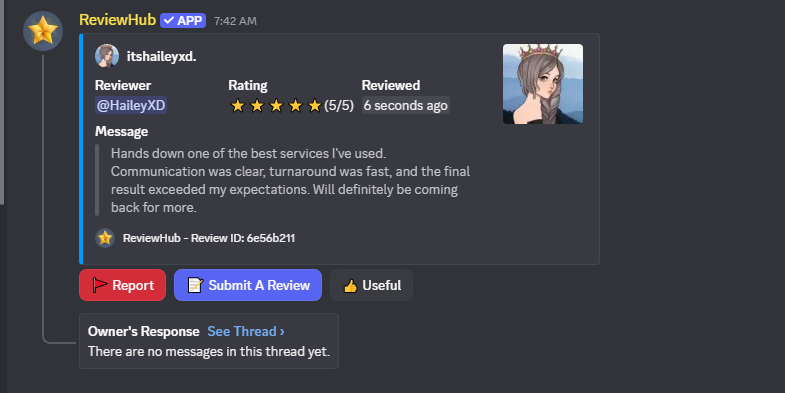
Embed layout style - Classic (default) or Detailed
/config access - Roles
ratemerole
Add a role for /rateme command
ratemeroleremove
Remove a /rateme role from the list
ratemeroleclear
Remove all /rateme roles
reviewcommandrole
Add a role for /review, /vouch, and vouch submit flows (optional)
reviewcommandroleremove
Remove a main /review & /vouch role from the list
reviewcommandroleclear
Remove all main command roles
/config server - Threads
autothread
Auto-create discussion threads
threadtitle
Default thread title
/config server + appearance - Customization
reviewtitle
Custom embed title
reviewembedcolor
Embed color (hex)
ratememessage
Custom /rateme message
reviewrequesttitle
Review request title
rateexperiencetitle
Rate experience title
reviewbuttonlabel
Submit button label
reviewcommand
Enable/disable /review
reviewcommandname
Command name (review/vouch)
staremoji
Custom star emoji
reviewauthortext
Custom author text
deletereviewrequests
Delete requests after submit
vouchmode
Enable recommendation mode
reportbuttonemoji
Report button emoji
submitreviewemoji
Submit button emoji
usefulbuttonemoji
Useful button emoji
Review Templates
ReviewHub supports two embed layout styles for reviews and vouches. You can switch between them using /config appearance reviewtemplate or from the Control Panel. All other customization options (color, emojis, titles) still apply regardless of which template you choose.